

Web Design Best Practices for SEO in 2026: What Actually Moves the Needle
Most articles on this topic hand you a checklist and call it strategy. Compress your images. Use HTTPS. Add alt text. Done.
That approach would have been adequate in 2021. In 2026, it’s the equivalent of checking your tire pressure while ignoring the engine. The fundamentals still matter — but the gap between a website that ranks and a website that dominates has shifted decisively toward something more sophisticated: the intersection of design architecture, AI system behavior, and search engine rendering mechanics.
This guide covers what the checklist articles miss entirely. Not because the basics are wrong, but because they’re table stakes. The real competitive edge now lives in understanding how your design decisions interact with Google’s AI evaluation layer, how your DOM structure affects whether AI Overviews cite your content, and which popular design trends are quietly generating ranking penalties that most teams never detect.
If you’re a business owner trying to understand where your website investment should go in 2026, or a marketer pushing your dev team toward better decisions, what follows is the practical, mechanism-level truth that the surface-level content won’t give you.
Why “SEO-Friendly Design” No Longer Means What You Think It Does
For years, SEO-friendly design meant one thing: make it easy for Googlebot to crawl and index your pages. Clean URLs, fast load times, mobile responsiveness, and proper heading structure. That framework was accurate and useful.
It’s still necessary. It’s no longer sufficient.
Google’s search infrastructure in 2026 operates on two distinct evaluation layers that most designers and marketers treat as one:
Layer 1 — The Crawl and Index Layer: Can Googlebot access, render, and understand your content? This is the traditional technical SEO layer. It covers Core Web Vitals, mobile usability, structured data, internal link architecture, and canonical signals.
Layer 2 — The AI Evaluation Layer: Does your page’s content, structure, and topical positioning signal enough authority and trustworthiness to surface in AI Overviews, featured snippets, and answer engine results? This layer isn’t just about what you say — it’s about how your page is architecturally designed to communicate it.
Most web designers are building for Layer 1 only. The teams winning in organic search right now are building for both simultaneously, from the wireframe stage, not as an afterthought once the site is live.
The practical implication: design decisions you used to think of as purely visual — heading structure, DOM order, content block modularity, navigation architecture — are now SEO decisions with measurable ranking consequences.
The Core Web Vitals Foundation: What’s Changed and What Hasn’t
Core Web Vitals remain non-negotiable. Google’s page experience signals continue to influence rankings, and with INP (Interaction to Next Paint) having fully replaced FID, the performance bar in 2026 demands a more honest look at how modern design patterns interact with browser rendering.
Here’s the current benchmark landscape:
| Metric | Good | Needs Improvement | Poor | Primary Design Risk |
|---|---|---|---|---|
| LCP (Largest Contentful Paint) | ≤ 2.5s | 2.5s – 4.0s | > 4.0s | Hero videos, unoptimized above-fold images, render-blocking fonts |
| INP (Interaction to Next Paint) | ≤ 200ms | 200ms – 500ms | > 500ms | Heavy JavaScript event listeners, complex animations on interaction |
| CLS (Cumulative Layout Shift) | ≤ 0.1 | 0.1 – 0.25 | > 0.25 | Dynamic content injection, lazy-loaded images without reserved dimensions, smart sticky headers |
| TTFB (Time to First Byte) | ≤ 800ms | 800ms – 1800ms | > 1800ms | Server-side rendering gaps, unoptimized hosting, excessive redirects |
What’s important to understand about this table is that every “Primary Design Risk” column entry represents a decision made in the design phase, not the development phase. By the time your developer is building the sticky header behavior or integrating the hero video, reversing that decision costs multiples of what it would have cost to make the right call in the wireframe.
LCP: The Hero Section Is Still Your Biggest Risk
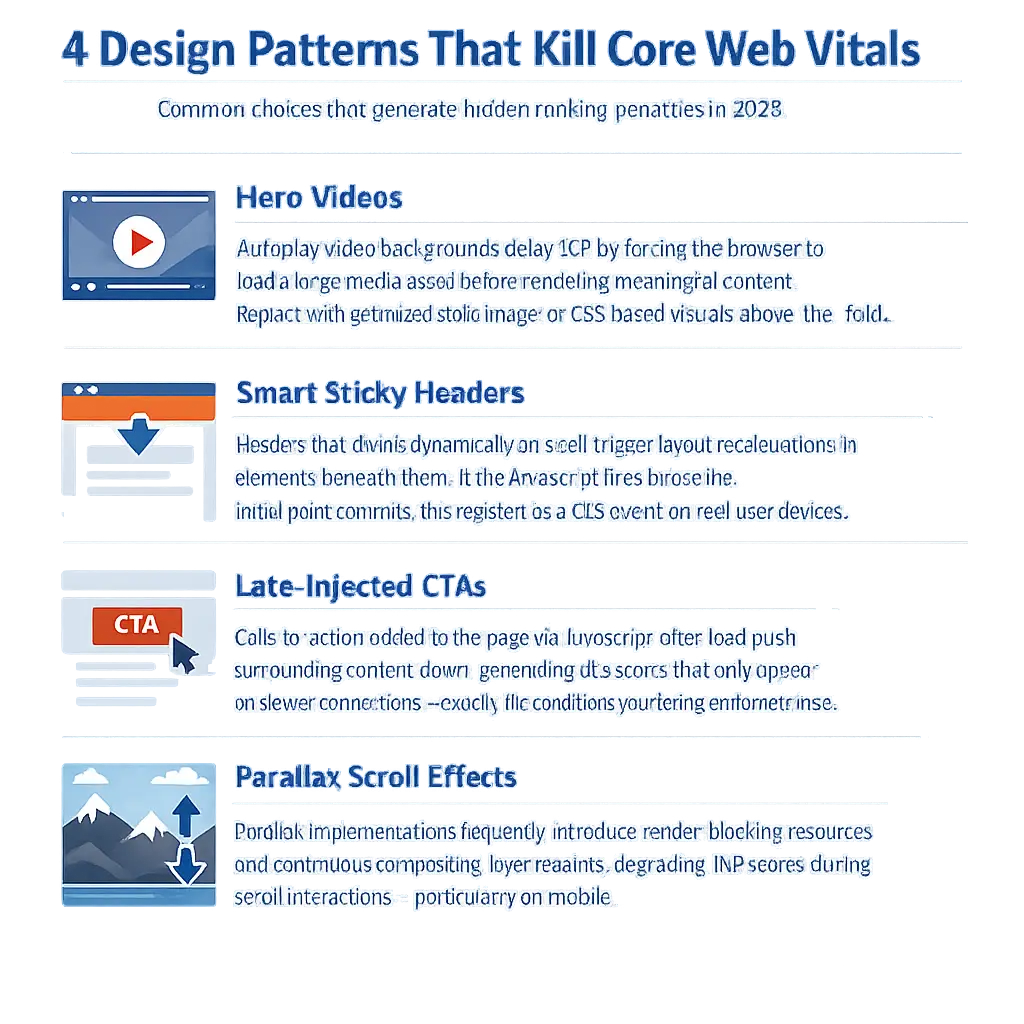
The largest contentful paint almost always maps to your hero section. In 2026, the most common LCP killers are hero videos, web fonts that block rendering, and images loaded via CSS background properties rather than native <img> elements. Googlebot and real users both suffer from these choices, and they compound — a slow LCP on mobile devices (which now represent the majority of web traffic in most industries) directly influences your mobile Core Web Vitals score, which Google weights in its ranking signals.
The fix is architectural: define your hero element as a natively loaded, properly sized <img> with fetchpriority="high" and explicit width and height attributes. This tells the browser to prioritize that resource immediately, without waiting for CSS parsing or JavaScript execution.
INP: JavaScript-Heavy Designs Are Paying a Measurable Tax
INP measures responsiveness — specifically, how long it takes for the page to visually respond after a user interaction. The primary culprit in most modern web builds is JavaScript-heavy component frameworks that attach heavy event listeners across the DOM, or animations tied to interaction events that block the main thread.
If your design relies on animated micro-interactions, modal systems, or scroll-triggered content reveals, your dev team needs to be auditing the main thread impact of those choices at build time, not after launch. The performance budget for interaction responsiveness on mid-range mobile devices is unforgiving. For a deeper look at how speed issues compound across a full site, the Website Speed Optimization for Small Business (Real Fix) article breaks down the diagnostic and remediation process in practical terms.
The Anti-Patterns Nobody Warns You About
Every article on this subject tells you what to do. Almost none of them explain what to stop doing. These are the design patterns most likely to be actively harming your search performance right now.
JavaScript-Rendered Navigation
Navigation built with JavaScript — particularly single-page application (SPA) frameworks that render menu items client-side — creates a specific, well-documented problem: Googlebot’s initial HTML parse may see no navigation structure at all. Internal link equity, which is foundational to how PageRank flows through your site, depends entirely on anchor tags being present in the static HTML response.
If your navigation links are injected by JavaScript after the initial parse, you are effectively severing the internal linking architecture that tells Google which pages on your site carry authority. The fix is straightforward: navigation must be server-rendered HTML. The visual design can be as dynamic as your brand requires — the HTML structure cannot depend on JavaScript execution.
Parallax Effects and Render-Blocking Resources
Parallax scroll effects are a persistent design trend that carries a consistent performance cost. The mechanism is straightforward: parallax implementations require continuous calculation of element positions relative to scroll position, which triggers repeated compositor layer repaints. On mobile devices — where GPU and CPU resources are constrained — this directly degrades INP and can introduce CLS events when the parallax layer composition conflicts with standard document flow.
The practical recommendation is not to ban all parallax categorically, but to evaluate the performance cost explicitly before including it in a design system, and to ensure any parallax implementation is GPU-accelerated and isolated to its own compositor layer using will-change: transform.
Lazy Loading Without Reserved Dimensions
Lazy loading images is widely recommended — and correctly so — for reducing initial page weight. The error most design implementations make is failing to include explicit width and height attributes on lazy-loaded images. When these attributes are absent, the browser has no way to reserve space for the image before it loads. The result: content shifts when the image renders, generating CLS events that scale directly with how many lazy-loaded images appear in the user’s viewport during a session.
Every lazy-loaded image in your design should have explicit dimensions declared in the HTML. This is a design system requirement, not an optional polish step.
The Googlebot Personalization Blindspot: A Real Architecture Problem
Here is a challenge that virtually no mainstream content on this topic addresses, despite being one of the most consequential design architecture decisions you’ll make in 2026.
AI-driven personalization — serving different content, different hero messages, or different CTAs based on user segment, traffic source, or behavioral data — is a legitimate and effective strategy. The SEO problem emerges from how that personalization is implemented at the code level.
The vast majority of personalization implementations work by loading a base page and then using client-side JavaScript to replace or hide content blocks based on user attributes. The result: Googlebot’s mobile user agent renders a single, de-personalized version of your page — typically the most generic, lowest-authority version that exists in your system.
This creates a measurable divergence. The content your best-converting landing page serves to a qualified prospect is not the content that ranks. Your highest-authority content is invisible to the search engine.
The Crawl-Safe Personalization Architecture
Solving this does not mean abandoning personalization. It means building a crawl-safe architecture from the start:
- The canonical layer — what Googlebot indexes — must contain your highest-authority, most topically complete content. This is the non-negotiable foundation.
- Personalization is applied above the canonical layer, using CSS class toggling, edge-side includes, or server-side rendering decisions that preserve the base content in the DOM rather than replacing it.
- Structured data,
<head>metadata, and internal link architecture must reflect the canonical intent — not any personalized variant. If your personalization system is rewriting title tags or meta descriptions per segment, you have a serious crawlability problem.
This is a decision made in the architecture phase. A web designer or developer who doesn’t understand Google’s two-wave rendering process — the initial HTML parse followed by deferred JavaScript rendering — will build a personalization system that inadvertently hides your best content from search engines. If you’re working with an agency or developer to build or redesign your site, this conversation needs to happen before a single wireframe is approved.
How Page Structure Determines Whether AI Overviews Cite Your Content
This is the section where we move from technical compliance into genuine competitive advantage.
Google’s AI Overviews, and the broader ecosystem of AI-powered answer engines pulling from indexed content, don’t evaluate pages the way a human reader does. They use what can be described as a chunk-signal hierarchy — an extraction process that looks for specific structural indicators before deciding whether to surface your content in a generated answer.
Understanding this changes how you brief designers on content structure.
The Four Structural Factors That Influence AI Citation
1. Self-Contained Answer Units
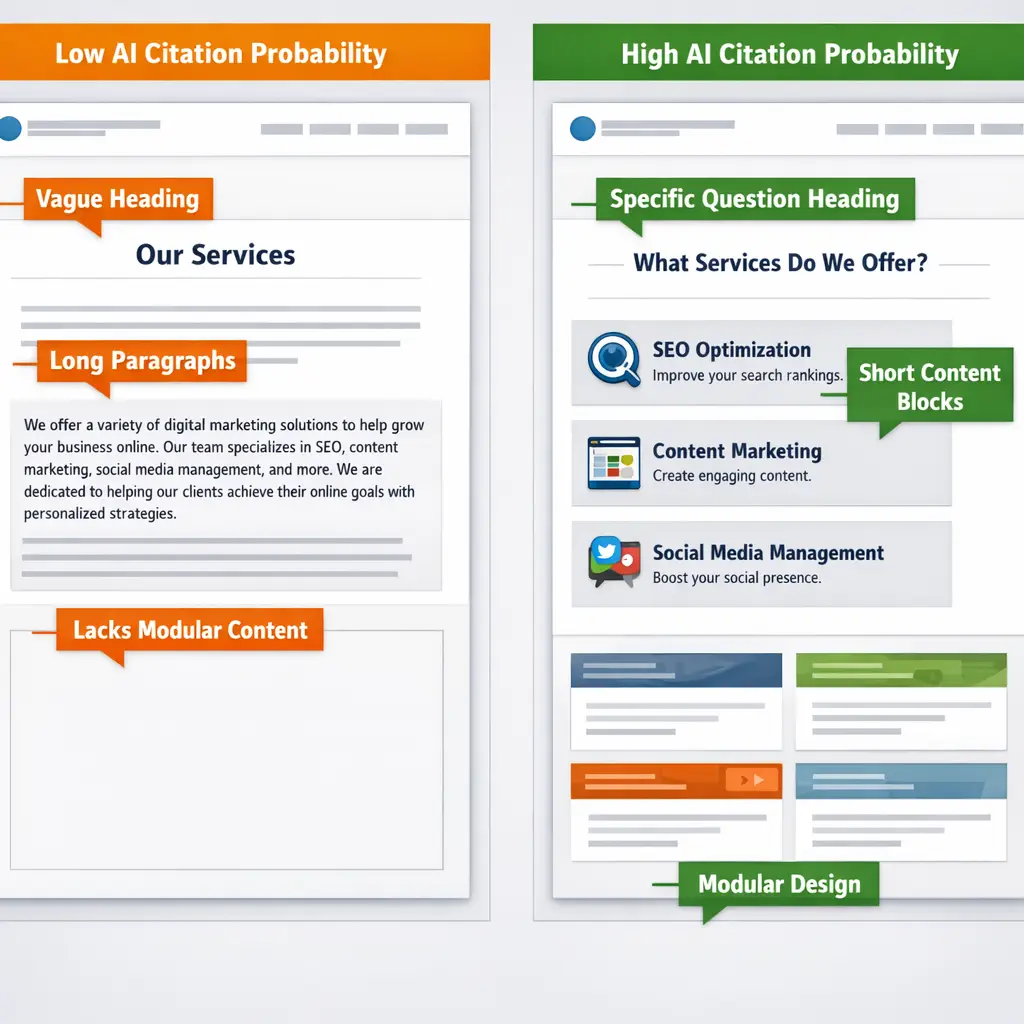
AI extraction systems favor content that fully resolves a specific question within a single, bounded unit — a heading plus two to four sentences that don’t require surrounding context to make sense. Long, flowing narrative paragraphs are structurally harder to extract from. Modular, context-independent content blocks are structurally optimized for AI citation.
This has a direct implication for content design: your page layout should make it visually and structurally natural to write in self-contained blocks. Design systems that push toward long undifferentiated content columns are working against your AEO goals.
2. Heading Specificity as a Confidence Signal
LLMs use heading text as a confidence anchor when attributing extracted information. A heading that reads “How Interaction to Next Paint Affects Mobile Rankings in 2026” is dramatically more extractable than a heading that reads “Why Performance Matters.”
Vague headings reduce citation probability. Specific, question-resolving headings increase it. This is a copywriting and information architecture decision, and it should be part of how your design team thinks about content hierarchy — not a detail left to whoever writes the copy after the design is locked.
3. DOM Order as an AEO Signal
Content appearing within the first 20% of your page’s DOM — not the visual fold, but the actual Document Object Model order — is statistically more likely to appear in AI-generated summaries. Visual design can place content anywhere on the screen, but DOM order is determined by how your HTML is structured.
Design decisions about which content blocks appear early in the DOM versus late are therefore answer engine optimization decisions. A business’s most authoritative, question-resolving content should appear early in the DOM hierarchy, even if visual layout techniques arrange it differently on screen.
4. Structured Data as Disambiguation, Not Just Rich Result Eligibility
Most teams implement schema markup because it’s a checkbox on an SEO audit — it makes you eligible for rich results. Expert-level implementation uses it differently: using @type, mentions, and isPartOf schema relationships to explicitly communicate to AI systems what category of knowledge this page represents, what entities it discusses, and how it relates to other content on the site.
This dramatically improves topical authority signals at the AI evaluation layer. It’s not more work — it’s smarter use of the markup work you’re already doing.
Semantic HTML and Accessibility: The SEO Signal Relationship Most Teams Miss
Every article on this subject mentions WCAG accessibility compliance. Almost none of them explain the direct, mechanistic relationship between accessibility improvements and Core Web Vitals performance.
Here’s the mechanism: proper semantic HTML — using <nav>, <main>, <article>, <section>, <header>, and <footer> elements correctly — reduces DOM complexity. Bloated, non-semantic DOM trees built with nested <div> structures require the browser to do significantly more work during style calculation, layout, and paint phases. This directly increases Total Blocking Time and INP scores.
What Semantic Markup Does For You Simultaneously
- Reduces DOM complexity, which improves INP and TBT performance metrics
- Gives Googlebot explicit structural signals about the role and hierarchy of your content
- Enables assistive technologies to navigate your site correctly, satisfying both WCAG requirements and the user experience signals Google measures through Core Web Vitals (particularly interaction-related metrics)
- Improves the quality of AI content extraction, because AI systems leverage HTML semantics to understand content boundaries and hierarchy
Building with semantic HTML is not an accessibility checkbox — it’s a performance, SEO, and AI visibility strategy that pays dividends across multiple ranking factors simultaneously. Teams that treat it as a compliance requirement are leaving measurable performance gains on the table.
Navigation Architecture and Crawl Budget
Navigation structure deserves specific attention because it controls two things that are easy to overlook: user experience and crawl budget allocation.
Crawl budget — the number of pages Googlebot will crawl on your site within a given time period — is a finite resource. Flat, logical navigation hierarchies that expose your highest-priority pages within two to three clicks from the homepage direct crawl budget toward the pages that matter. Deep, complex navigation hierarchies, or navigation that relies on JavaScript rendering to expose links, fragment your crawl budget and can result in important pages being crawled infrequently or not at all.
The standard recommendation of five to seven top-level navigation items exists for a reason: it forces information architecture clarity that benefits both users and crawlers. When navigation sprawls beyond that, it’s typically a signal that the site’s content hierarchy hasn’t been properly organized — and that’s an SEO problem as much as a UX problem. The Technical SEO Audit for Small Business: Fix What Matters article walks through exactly how to identify and prioritize these structural issues across an existing site.
Building for 2026: The Design Brief Checklist That Covers What Others Miss
The following represents the questions that should be answered before your design moves from wireframe to development. These aren’t technical specifications — they’re strategic decisions that your design and development team needs to make consciously, not by default.
Core Architecture Decisions:
– Is all navigation rendered as server-side HTML, independent of JavaScript execution?
– Is the hero section’s largest element a natively loaded <img> with explicit dimensions and fetchpriority="high"?
– Are explicit width and height attributes declared on all lazy-loaded images throughout the design?
– Does the personalization system preserve the full canonical content layer in the DOM, or does it replace content client-side?
AI and Answer Engine Readiness:
– Does the content structure use specific, question-resolving headings at every H2 and H3 level?
– Is body copy organized in modular, context-independent blocks rather than long narrative sections?
– Does high-authority, question-resolving content appear in the first 20% of DOM order?
– Does the structured data implementation include entity relationships (mentions, isPartOf) beyond basic schema type declarations?
Semantic and Accessibility Foundation:
– Is the HTML built with semantic landmark elements rather than generic <div> nesting?
– Does every interactive element have explicit ARIA labels where native HTML semantics are insufficient?
– Are color contrast ratios meeting WCAG AA minimums at the design system level, not retrofitted after build?
Performance Design Decisions:
– Have all parallax effects been evaluated for their INP and CLS impact on mid-range mobile devices?
– Have sticky header scroll behaviors been tested for CLS on slow connections and uncached sessions?
– Is the design free of above-the-fold CSS background images where a native <img> element would serve the same visual purpose?
These questions don’t require a design team to be SEO specialists. They require the people briefing and approving designs to understand that every visual decision carries a technical consequence — and that those consequences compound across performance, rankings, and AI visibility simultaneously.
The Interdependency That Changes Everything
The most significant insight in this entire topic is one that the checklist format structurally cannot communicate: these practices are not independent items. They are a system with compounding interactions.
Your navigation architecture directly affects your crawl budget allocation, which determines which pages accumulate authority, which determines which pages are eligible for AI Overview citation. Your semantic HTML choices directly reduce DOM complexity, which improves INP scores, which improves Core Web Vitals, which influences your page experience ranking signal. Your personalization implementation either preserves or undermines your indexed content authority, which determines whether your ranking positions hold when Google refreshes its index.
A site built with this systemic understanding doesn’t just pass technical audits — it builds compounding advantages over time. Each well-made design decision strengthens the others.
That’s what separates a website built to rank from a website built to look good and hope for the best. And in 2026, that gap translates directly into leads, traffic, and revenue — the metrics that actually determine whether your digital investment is working.
If you’re ready to audit your current site against these standards, or build something new with this architecture in mind, Mongoose Digital Marketing offers a free consultation to identify exactly where the gaps are and what addressing them is worth to your business.
Final Strategic Recommendations for 2026
If you’ve read this far, you understand the stakes. The next step is knowing exactly where to direct your energy. These three priorities represent the highest-leverage moves for any site heading into the second half of the decade.
1. Run a Core Web Vitals and Crawlability Audit Using Google Search Console and PageSpeed Insights
Both tools are free, authoritative, and updated to reflect Google’s current ranking criteria. Start with the Core Web Vitals report in Search Console to identify pages failing INP, LCP, or CLS thresholds, then use PageSpeed Insights for page-level diagnostics that include specific, actionable recommendations. This gives you a factual baseline before making any design or development changes.
2. Conduct a Semantic Audit of Your Existing HTML Structure
Use a browser extension like Web Developer Toolbar or a headings-level checker to map how your current pages are actually structured versus how you intended them to be structured. Look specifically for heading hierarchy violations, missing landmark elements, and any content rendered exclusively through CSS that carries information a crawler or assistive technology would need to interpret. This audit costs nothing but time and frequently reveals the exact issues suppressing your organic performance.
3. Evaluate Your JavaScript Rendering Dependency
Use Google’s Rich Results Test and the URL Inspection tool in Search Console to see what Googlebot actually renders versus what a human browser displays. If meaningful content, navigation, or internal links are absent from the rendered view, you have a client-side rendering problem that no amount of keyword optimization will overcome. For teams running React, Vue, or similar frameworks, this is the single most important diagnostic step available in 2026.
Frequently Asked Questions
Does web design actually affect SEO rankings, or is that mostly a content and link-building issue?
Web design directly affects rankings through multiple mechanisms that have grown more significant over time. Page experience signals — including Core Web Vitals like Interaction to Next Paint and Cumulative Layout Shift — are active ranking factors, and both are determined almost entirely by design and development decisions. Navigation architecture affects how crawl budget is distributed across your site. Semantic HTML structure affects how well search engines and AI systems understand your content. Visual design choices affect whether content is rendered in an indexable format or hidden behind interactions that crawlers cannot execute. Content and links matter enormously, but they operate on a technical foundation that your design either supports or undermines.
What is the difference between mobile-friendly and mobile-first design in an SEO context?
Mobile-friendly means your site does not break on a phone. Mobile-first means your design process begins with the smallest, most constrained screen and expands outward — which produces fundamentally different technical outcomes. Because Google uses mobile-first indexing, the mobile version of your site is the version that determines your rankings. A site designed desktop-first and then adapted for mobile often carries layout, performance, and content trade-offs in the mobile version that directly suppress organic performance. Mobile-first design avoids those trade-offs by treating the mobile experience as the primary product, not an afterthought. For a broader look at what modern responsive design actually requires beyond basic breakpoints, the linked article covers the technical standards that matter in practice.
How does web design influence whether a site appears in AI Overviews or gets cited by AI tools?
AI systems — including Google’s AI Overviews and third-party tools like ChatGPT’s browsing feature — depend on the same crawlability, structured content, and semantic clarity that traditional search rankings require. Pages with clear heading hierarchies, logically organized content blocks, and HTML that accurately describes what elements are tend to be more easily parsed and cited. Pages where key content is loaded via JavaScript after the initial render, or where navigation is fragmented, are harder for AI systems to extract coherent answers from. The design practices that serve crawlers in 2026 serve AI systems for the same underlying reasons.
How often should a site be audited for SEO-related design issues?
A meaningful audit should happen any time significant design changes are made, any time a performance regression appears in Search Console or analytics, and on a scheduled basis at least twice per year regardless of visible changes. Design systems accumulate technical debt quietly — a new component added without performance consideration, a third-party script included for a short-term campaign, a template change that affects heading structure site-wide. These issues rarely announce themselves. Scheduled audits catch them before they compound into ranking drops that are difficult to diagnose after the fact.
Conclusion
Building a website that ranks well in 2026 requires more than good intentions at the design stage — it requires someone who understands how visual decisions translate into technical signals, and how those signals interact with search algorithms, AI systems, and user behavior simultaneously. Mongoose Digital Marketing works at exactly that intersection, offering web design and SEO services that are developed together from the first wireframe rather than patched together after launch. If your current site isn’t performing the way the investment deserves, the most useful next step is a straightforward conversation about what the gaps are and what closing them looks like for your specific situation. Get a Free Estimate and find out what a design built to rank can do for your business.