
Key Takeaways
- Crawl budget and indexing budget are two distinct technical concepts — a page can be crawled by Googlebot but still excluded from the index due to noindex tags, canonical misattribution, or soft 404 errors, meaning “no crawl errors” does not confirm a page is ranking-eligible.
- INP (Interaction to Next Paint), which replaced First Input Delay as a Core Web Vitals metric in March 2024, is the most frequently failing metric on Dayton local business websites, typically caused by third-party script bloat from chat widgets and scheduling tools rather than raw page size.
- Combining LocalBusiness, Review, and FAQPage schema types in a single implementation creates compounding SERP real estate — triggering rich results, star ratings, and expandable FAQ answers simultaneously — which meaningfully increases click-through rates beyond what any single schema type achieves alone.
- Mobile-first indexing means Google uses a site’s mobile version as the authoritative version for ranking purposes, so any content, structured data, or internal links that are conditionally hidden on mobile are effectively invisible to Google’s ranking systems.
- A technical SEO audit that surfaces 150+ flagged issues without prioritizing them by ranking impact is not a strategy — the critical path fixes that move rankings are rarely more than a handful, and identifying them requires log-file analysis and field data, not just crawler reports.
Most Dayton businesses that come to us with stalled rankings are not losing ground because of weak content or a thin backlink profile. They’re losing because their website’s technical foundation is quietly working against them — and nobody has told them why.
Technical SEO is the layer of your website that search engines interact with before they ever evaluate your content or authority. It governs whether Googlebot can find your pages, whether those pages make it into the index, how efficiently your server communicates with crawlers, and whether your site’s performance signals are strong enough to compete in your specific market. When this layer has problems — and for most Dayton businesses it does — no amount of content production or link building fully compensates.
This guide is not a glossary. You won’t find a list of terms followed by one-sentence definitions. What you will find is an honest, practitioner-level breakdown of how technical SEO actually works, where Dayton businesses in healthcare, legal, home services, manufacturing, and aerospace consistently run into problems, and what separates a technical SEO engagement that moves rankings from one that generates a report and collects a fee.
What Technical SEO Actually Controls (And What It Doesn’t)
Technical SEO operates at the server, architecture, and code level of your website. It is distinct from on-page SEO (content, meta descriptions, keyword targeting) and off-page SEO (backlinks, citations, brand signals). Conflating these categories is one of the most common signs that an agency doesn’t have a dedicated technical specialist — and it’s worth knowing the difference before you engage anyone.
Here is what falls squarely within technical SEO:
- Crawlability — Whether Googlebot can access and navigate your site’s pages without being blocked by robots.txt directives, redirect chains, or server errors
- Indexability — Whether pages that are crawled are eligible to be added to Google’s index, which is a separate question from crawlability
- Site architecture — How pages are structured, linked internally, and grouped by topic or category, and whether that structure supports or dilutes topical authority
- Canonicalization — How duplicate or near-duplicate content is handled across URLs so Google correctly identifies the preferred version
- Rendering — Whether Googlebot can see your full page content, including content generated by JavaScript frameworks
- Core Web Vitals — Page performance metrics including LCP (Largest Contentful Paint), INP (Interaction to Next Paint), and CLS (Cumulative Layout Shift) that feed directly into Google’s ranking signals
- Structured data — Schema markup that communicates page context to search engines and enables rich results in the SERP
- HTTP status codes and redirect management — How your server responds to requests, and whether redirect chains are compounding crawl inefficiency
- Hreflang and international targeting — Relevant for businesses with multilingual audiences
- Server log analysis — Examining raw server logs to understand how Googlebot actually behaves on your site versus how you assume it behaves
Notice that keyword research, content writing, and meta tag optimization are not on that list. They matter — significantly — but they belong to a different discipline. When you are evaluating technical SEO services in Dayton, ask directly: does this agency have someone whose specific expertise is this engineering layer? Or does “technical SEO” mean they run Screaming Frog before writing content?
The Crawl Budget Problem Most Dayton Businesses Don’t Know They Have
Googlebot does not have unlimited time to spend on your website. It allocates a crawl budget — essentially a finite number of requests it will make to your server within a given period — based on your site’s authority, crawl demand, and server health. For small brochure sites with under 50 pages, crawl budget is rarely a limiting factor. But for Dayton businesses with service area pages, location landing pages, large product catalogs, or e-commerce functionality, crawl budget misallocation is a silent ranking liability.
How Crawl Budget Gets Wasted
The most common crawl budget drains we identify for local Ohio businesses include:
Faceted navigation and parameter URLs. If your site has filtering functionality — common in home services, healthcare directories, or e-commerce — each filter combination typically generates a unique URL. A roofing company in Kettering with filter parameters for material type, service area, and price range could inadvertently generate thousands of URLs that Googlebot crawls repeatedly instead of focusing on revenue-critical service pages.
Duplicate location pages. This pattern appears constantly among Dayton businesses serving multiple suburbs. A company with nearly identical pages for Dayton, Huber Heights, Miamisburg, Centerville, and Beavercreek — differentiated only by the city name swapped into the copy — is presenting Google with thin, duplicate content while also fragmenting crawl attention across pages that aren’t earning their keep in the index.
Broken internal links and redirect chains. Every 301 redirect Googlebot follows consumes crawl budget. A chain of three redirects to reach a page consumes three times the budget of a direct link. Sites that have gone through redesigns without redirect auditing often have multi-hop chains that slow Googlebot down and reduce crawl efficiency.
Session IDs and tracking parameters in URLs. Marketing teams frequently add UTM parameters or session identifiers to URLs without considering the impact on crawlability. Without proper canonicalization, these can create hundreds of duplicate URLs that Googlebot wastes budget crawling.
Why Screaming Frog Alone Doesn’t Diagnose This
A crawler report shows you what a bot can access. A server log analysis shows you what Googlebot actually did — which pages it visited, how often, in what sequence, and where it stopped. These are different data sets, and only the second one tells you whether your crawl budget is being spent on your most important pages.
For Dayton businesses with multi-location service structures, we use server log analysis to map Googlebot’s actual crawl behavior and compare it against the pages that generate the most revenue. The gap between those two sets is where the real technical work happens.
Crawl vs. Index: Why “No Errors” Doesn’t Mean “No Problem”
This distinction is fundamental, and it’s missing from nearly every competitor’s explanation of technical SEO services in the Dayton market.
Crawling is the act of Googlebot visiting a URL and reading its content. Indexing is the decision to add that URL to Google’s database of searchable pages. These are sequential but independent events. A page can be crawled and excluded from the index for multiple reasons — and if your reporting only shows crawl status, you are looking at an incomplete picture.
Common reasons a crawled page may not be indexed:
| Issue | What’s Happening | Ranking Impact |
|---|---|---|
| Noindex tag present | Developer or plugin added a noindex directive; page is crawled but intentionally excluded | Page will never rank — immediate fix required |
| Canonical misattribution | Page points to a different URL as canonical; Google honors the canonical and ignores this version | Page may rank under the wrong URL or not at all |
| Soft 404 | Page returns a 200 status code but presents thin or no content; Google treats it as an error page | Page excluded from index; damages site quality signals |
| Duplicate content | Near-identical content across multiple URLs; Google selects one version to index and may not choose yours | Ranking equity diluted across variants |
| Orphaned pages | Page exists but has no internal links pointing to it; Googlebot rarely discovers or revisits it | Page unlikely to be indexed or maintained in index |
| Low-quality signals | Page is indexed but Google’s quality systems down-rank or eventually de-index thin pages | Gradual loss of visibility; hard to diagnose without index coverage monitoring |
For Dayton service businesses — particularly those in home improvement, legal services, and healthcare — soft 404s are the most frequently overlooked indexing problem. A service page with fewer than 300 words of meaningful content, no internal links, and no structured data can technically “pass” a crawl audit while sitting outside the index entirely.
Core Web Vitals in 2024: What’s Actually Failing for Dayton Businesses
The “page speed matters” talking point is not wrong — it’s just incomplete to the point of being misleading. Google’s Core Web Vitals framework measures three specific, distinct aspects of user experience, and they are not equally impactful or equally understood.

Why INP Is the Metric You Should Be Focused On Right Now
LCP gets most of the attention because it’s the most intuitive metric — it’s essentially a loading speed measurement. But INP, introduced as a Core Web Vitals metric in March 2024, is the one most Dayton local business websites are currently failing without knowing it.
INP measures how long it takes for your page to visually respond to any user interaction — a click, a tap, a form input — at any point during the session. It is not measured once at load time. A page can load quickly and still fail INP catastrophically because a chat widget, a review aggregator embed, or a third-party scheduling tool fires heavy JavaScript that ties up the browser’s main thread.
This is a specific pattern we see consistently across Dayton’s competitive verticals:
- Legal firms running live chat software alongside Google Tag Manager, a call tracking script, and a client portal integration
- Healthcare practices embedding patient scheduling tools (Zocdoc, Phreesia, or similar) that load third-party JavaScript synchronously
- Home service businesses with review widgets from three different platforms firing simultaneously on page load
None of these additions were implemented by someone thinking about Core Web Vitals. They were added by marketing teams or front-desk staff trying to improve conversion. The result is an INP score that fails Google’s threshold and quietly suppresses rankings.
The fix is rarely “remove the tool.” It is typically deferred script loading, facade patterns that replace live embeds with lightweight placeholders until user interaction, and careful prioritization of which third-party resources load in the critical path. For a deeper look at how page performance connects directly to lead volume, see our guide on website speed optimization for small business.
Field Data vs. Lab Data: The Distinction That Determines Your Rankings
When you run a PageSpeed Insights test, you see two sections: lab data and field data. Lab data is a simulation run from a controlled environment. Field data — drawn from the Chrome User Experience Report (CrUX) — reflects the actual performance your real visitors are experiencing on their real devices and connections.
Google’s ranking systems use field data, not lab scores. A site that scores 90 in a PageSpeed lab test can still have poor field data if its real users are on mid-range Android devices on spotty LTE connections — which describes a significant portion of Dayton’s consumer demographics. Optimizing for a lab score while ignoring CrUX data is a common and measurable mistake.
Structured Data Strategy for Dayton’s Dominant Industries
Most discussions of schema markup treat it as a checklist item: implement LocalBusiness schema, validate it, move on. That approach leaves substantial SERP real estate on the table.
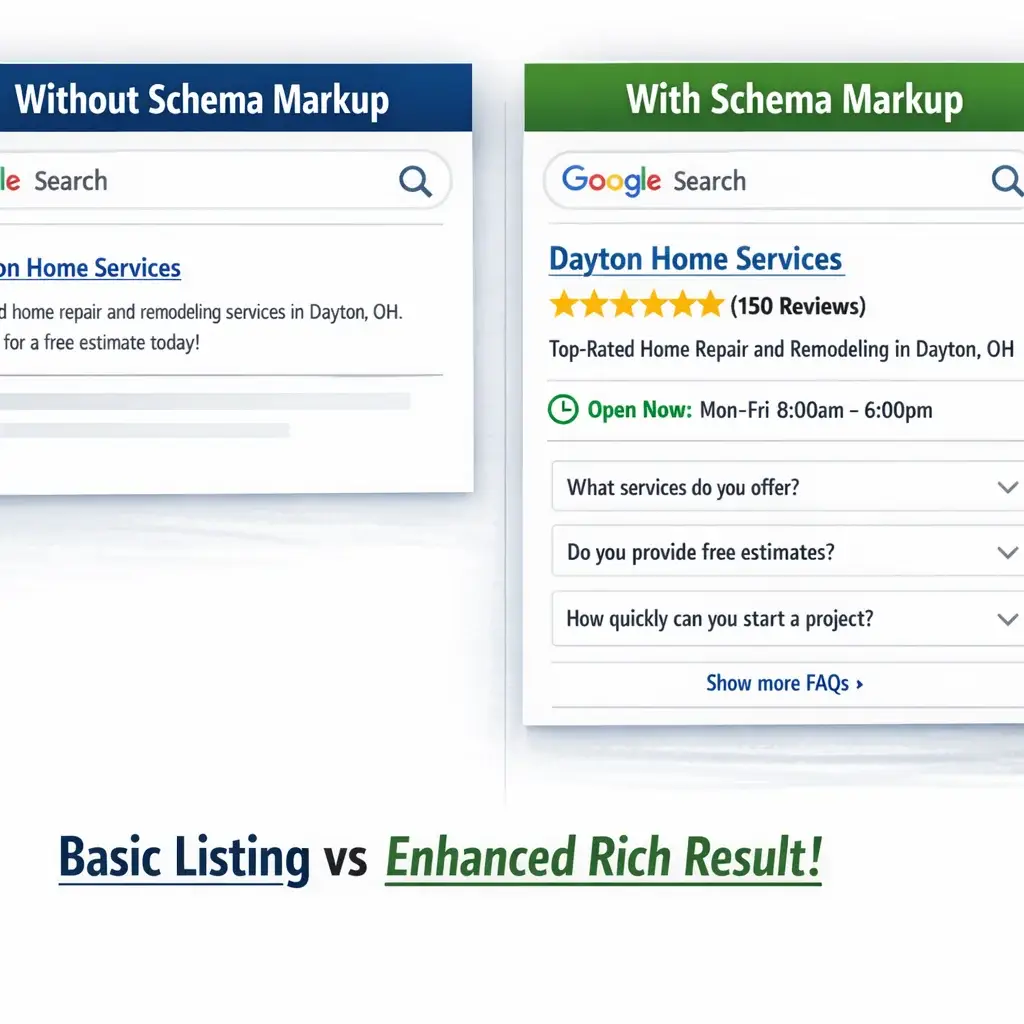
Structured data done strategically — with the right schema types, in the right combinations, validated against Google’s actual rich result eligibility requirements — can change how your listing appears in search results in ways that directly increase click-through rates before you’ve moved a single ranking position.
Schema Type Selection by Dayton Industry Vertical
Different industries qualify for different rich result types, and the combinations matter:
Healthcare practices (Dayton, Kettering, Beavercreek):
– MedicalOrganization for the practice entity
– Physician for individual practitioners
– MedicalClinic with openingHoursSpecification
– FAQPage for patient education content
– Review schema where eligible
This combination can surface a SERP listing that shows star ratings, hours, and expandable FAQ answers — three distinct visual elements that increase listing size and authority in the results page.
Legal firms (Dayton metro area):
– LegalService with areaServed specifying Dayton, Montgomery County, and surrounding service areas
– Attorney for individual lawyer profiles
– FAQPage for practice area pages
– BreadcrumbList for site architecture signaling
Home service businesses (serving Huber Heights, Centerville, Miamisburg, Springboro):
– HomeAndConstructionBusiness or specific subtypes (Plumber, Electrician, HVAC, etc.)
– LocalBusiness with precise areaServed geography
– Review schema
– FAQPage on service pages
– HowTo schema where service content walks through a process
Manufacturing and aerospace subcontractors (a sector Dayton holds disproportionately):
– Organization with naics code specification
– Product schema for manufactured components where applicable
– FAQPage for capability and compliance documentation
Invalid Schema Is an Active Liability, Not Just a Missed Opportunity
Most agencies frame schema errors as missed opportunities — you didn’t get the rich result. That’s true, but it understates the risk. Google’s Search Console surfaces schema errors specifically because invalid structured data can be interpreted as a manipulation signal. A Review schema that aggregates ratings in a way that violates Google’s guidelines — for example, first-party reviews presented as third-party endorsements — can result in a manual action against your rich result eligibility, removing features from your listings entirely.
Invalid schema that generates warnings without manual actions still represents wasted crawl processing and signals lower technical quality to Google’s automated systems. Implementation without validation against live Google Rich Results Test output, and without ongoing monitoring in Search Console, is not a strategy — it’s a liability.
JavaScript Rendering: The Technical Problem Most Dayton Agencies Aren’t Equipped to Handle
If your website was built on a modern framework — React, Vue, Angular, Next.js — or uses a headless CMS architecture, your content may not be visible to Googlebot in the way your developers assume it is.
Googlebot renders JavaScript, but it does so in a deferred queue. When Googlebot first crawls a page, it often processes the HTML it receives immediately and adds the JavaScript rendering to a secondary queue that may not be processed for hours or days. If your page’s primary content — product descriptions, service information, headings, internal links — is injected into the DOM by JavaScript rather than present in the raw HTML response, that content may not be indexed at all, or may be indexed with significant delay.
This matters acutely for:
- Dayton businesses that have rebuilt their websites on React-based builders (Webflow with custom interactions, Gatsby, or similar)
- E-commerce sites using headless commerce platforms where product content is loaded client-side
- Sites using infinite scroll or lazy-loading for content that Googlebot cannot trigger
- Any site where the mobile version loads content via JavaScript that the desktop version serves in static HTML
Diagnosing rendering issues requires comparing the raw HTML source of a page (what the server delivers before JavaScript executes) against the rendered DOM (what the page looks like after JavaScript runs). If revenue-critical content, internal links, or structured data only appears in the rendered DOM, you have a rendering problem that a standard crawler audit will not surface.
The solution depends on the architecture: server-side rendering (SSR), static site generation (SSG), or dynamic rendering are all valid approaches with different trade-off profiles. The right answer depends on your site’s update frequency, content type, and hosting infrastructure — not a one-size recommendation. Our guide on web design best practices for SEO covers how these architectural decisions affect long-term search visibility in more detail.
What a Prioritized Technical SEO Audit Actually Looks Like
A technical audit that generates 150 flagged issues without a prioritization framework is not useful — it is overwhelming. The skill in technical SEO is not finding problems. Every crawler finds problems. The skill is correctly identifying which problems are actively suppressing rankings, which are background noise, and which need immediate remediation before other work can have any effect.
Here is how Mongoose approaches audit triage:
Priority Tier 1: Ranking-Blocking Issues (Fix First)
These issues directly prevent pages from appearing in search results or actively damage overall site quality signals:
- Accidental noindex on revenue pages or the entire site
- Canonical tags pointing to wrong URLs
- Blocked crawl of critical pages via robots.txt
- Soft 404s on indexed pages
- Redirect chains longer than two hops on high-priority pages
- Core Web Vitals failures confirmed in CrUX field data (not just lab scores)
- Invalid schema generating Search Console errors on key page types
Priority Tier 2: Crawl Efficiency and Index Quality Issues (Fix Second)
These issues don’t block individual pages but limit how efficiently Google processes and evaluates your site:
- Crawl budget waste from parameter URLs or faceted navigation
- Orphaned pages with no internal link equity
- Duplicate content without canonical resolution
- Internal link structures that don’t support topical authority
- JavaScript rendering gaps affecting secondary content
Priority Tier 3: Enhancement Opportunities (Address After Foundation Is Solid)
These items represent genuine improvements but won’t move rankings until the foundation is correct:
- Additional schema types for rich result eligibility
- Image optimization and next-gen format implementation
- Preconnect and resource hint optimization
- Log file analysis for long-term crawl behavior monitoring
How Technical Debt Compounds for Dayton Businesses Over Time
Technical SEO problems do not stay static. A site that launched with minor issues three years ago — a few orphaned pages, some parameter URLs without canonicalization, an INP score that barely missed the threshold — accumulates debt as content is added, redesigns occur, plugins are installed, and marketing tools are layered in.
The most costly scenario we encounter with Dayton businesses is an unplanned website migration. A company rebuilds their site, launches without an SEO migration plan, and within 90 days loses 40–70% of their organic traffic as Google processes the changed URL structures, broken internal links, missing redirects, and lost structured data. Recovering from a bad migration takes months, not weeks — and the ranking equity lost during that period is real revenue that cannot be recovered retroactively.
The preventive investment in a pre-migration technical SEO audit and redirect mapping plan is a fraction of the cost of rebuilding after a traffic collapse. For Dayton businesses in competitive verticals — legal, medical, home services — where organic search drives consistent lead flow, this is not a theoretical risk. It is a pattern we see regularly across the region. Our article on website redesign services that actually convert outlines what an SEO-safe migration process looks like before a single line of code changes.
Working With a Technical SEO Partner in Dayton: What to Expect
A genuine technical SEO engagement with Mongoose is not a one-time audit delivery. It is an ongoing diagnostic and remediation process that evolves as Google’s systems change, your site grows, and your competitive landscape shifts.
The starting point is always a complete technical baseline — not just a crawler report, but a combined analysis of your server logs, Search Console index coverage data, CrUX field performance, and structured data implementation. From that baseline, we build a prioritized remediation roadmap organized by impact tier, not alphabetical listing.
Progress is measured in concrete outcomes: pages moving from non-indexed to indexed, crawl efficiency improvements confirmed in log data, Core Web Vitals thresholds met in field data, and ultimately, ranking improvements and traffic growth tied to specific technical fixes. Every recommendation has a rationale, and every change is tracked.
If you’re a Dayton business that has invested in content, built backlinks, and still isn’t seeing the organic growth your site should be generating — the answer is almost certainly in the technical layer. We’d encourage you to start with a conversation. Mongoose offers a free consultation, and we won’t dress up a Screaming Frog export and call it a strategy.
Strategic Recommendations for 2026
As Google’s systems continue to mature and the technical bar for organic visibility rises, Dayton businesses investing in SEO need to be positioned ahead of the curve — not catching up to changes that have already impacted their rankings. Three specific priorities stand out for 2026:
1. Invest in Server Log Analysis as a Routine Practice
Most Dayton businesses rely entirely on crawler simulations to understand how Google interacts with their site. Crawlers approximate; log files tell you exactly what Googlebot requested, how often, and what it received in return. Tools like Screaming Log File Analyser or custom log parsing through Google Cloud Logging, when integrated with Search Console data, reveal crawl budget waste, indexing bottlenecks, and rendering failures that surface-level audits simply cannot detect. In 2026, this should be a standard quarterly practice, not an emergency diagnostic.
2. Prioritize INP Optimization Before It Costs You Rankings
Interaction to Next Paint is now a Core Web Vitals metric, and field data from real users — not lab simulations — is what Google uses for ranking signals. Many Dayton sites that passed LCP and CLS thresholds are still failing INP due to heavy JavaScript execution on interaction events. Use the Chrome UX Report (CrUX) dashboard and PageSpeed Insights’ field data tab to identify which pages and user segments are underperforming. Remediation often requires collaboration between your SEO partner and your development team to reduce main thread blocking during user interactions.
3. Conduct a Structured Data Audit Aligned to Current Schema.org Guidelines
Structured data implementations that were compliant two years ago may now be deprecated, incorrectly nested, or triggering manual actions in Search Console. In 2026, with AI-generated search experiences pulling more heavily from structured entity signals, clean and accurate Schema markup — particularly for local business, service, FAQ, and review entities — will matter more, not less. An audit should validate markup against current Google documentation, not just check for syntax errors with a generic validator.
Frequently Asked Questions
What does technical SEO actually include for a local Dayton business?
Technical SEO covers everything that affects how search engines crawl, index, and render your website — separate from the content you publish or the backlinks pointing to your domain. For a Dayton business, this typically includes site architecture and internal linking, page speed and Core Web Vitals performance, mobile usability, structured data markup, canonical tag configuration, XML sitemap accuracy, robots.txt directives, and HTTPS implementation. It also includes ongoing monitoring of index coverage in Google Search Console to catch crawl errors or manual actions before they cause lasting ranking damage.
How long does it take to see results from technical SEO improvements?
The timeline depends on the severity of the issues being fixed and how quickly Google re-crawls and re-indexes the affected pages. Simple fixes — like correcting redirect chains or resolving canonical conflicts — can see measurable impact within four to eight weeks if Googlebot crawls the pages promptly. More complex issues, such as rebuilding crawl architecture on a large site or recovering from a botched migration, typically require three to six months before ranking improvements become statistically clear. Progress should be tracked through concrete signals: indexation rates, crawl efficiency in log data, and Core Web Vitals field thresholds — not just keyword position snapshots.
Why isn’t my content ranking even though I’ve published consistently?
Consistent content publication is necessary but not sufficient for organic ranking growth. If the technical layer of your site has unresolved issues — poor crawl efficiency, slow page load times that fail Core Web Vitals field thresholds, thin internal linking to new pages, or duplicate content generated by URL parameter handling — Google may not be indexing your content at all, or may be indexing the wrong version of it. We regularly see Dayton businesses with well-written, locally relevant content that is effectively invisible in search because a technical barrier is preventing proper indexation or signaling low page quality to Google’s systems.
Is a one-time technical SEO audit enough, or do I need ongoing support?
A one-time audit produces a snapshot of your site’s technical health at a specific moment. It has real value as a starting point, but sites are not static — content is added, platforms are updated, Google’s crawling behavior shifts, and competitive dynamics change. Technical issues that don’t exist today can emerge after a CMS update, a template change, or a new content section is added. Ongoing technical SEO support ensures that remediation is implemented correctly, that new issues are caught early before they compound, and that your site’s technical foundation continues to improve over time rather than drifting back toward the problems that were originally identified.
Conclusion
For Dayton businesses — whether you’re operating in Kettering, Beavercreek, Centerville, or the core Dayton metro — the gap between a site that ranks and one that doesn’t is increasingly a technical problem, not a content problem. Mongoose Digital Marketing has deep experience diagnosing and resolving the specific technical barriers that prevent local sites from capturing the organic visibility they’ve earned. If your site isn’t performing the way your investment warrants, we’re here to show you exactly why — and exactly how to fix it. Contact Mongoose Digital Marketing to start with a free consultation.