

What Most Social Media API Guides Get Wrong (And What Actually Matters in Production)
Most articles about social media APIs read like a product catalog. Platform A has these endpoints, Platform B has those rate limits, here is what OAuth stands for. That information isn’t wrong — it’s just incomplete in ways that cost real engineering time and, eventually, real money.
This guide is different. It covers the mechanics competently, but its primary purpose is to address what experienced developers actually run into after the happy path: the silent token failures, the permission scope traps, the multi-tenant rate limit collapses that no documentation warns you about. Whether you’re evaluating whether to build a social media integration at all, or you’re already knee-deep in a production system that’s behaving unpredictably, the goal here is to give you a complete operational picture.
What a Social Media API Actually Is — And What It Isn’t
A social media API (Application Programming Interface) is a set of programmatic endpoints that lets your application interact with a social platform’s data and functionality without a human manually operating that platform’s interface. In practice, this means your software can publish posts, retrieve engagement metrics, respond to comments, pull audience demographics, and manage ad campaigns — all through structured HTTP requests rather than a browser session.
The key word there is programmatic. An API gives you machine-to-machine communication governed by authentication credentials, permission scopes, and request quotas. That’s the theory.
In practice, each major platform — Meta (Facebook and Instagram), X (formerly Twitter), LinkedIn, TikTok, YouTube, Pinterest, and Snapchat — maintains its own entirely separate API ecosystem. They share no common authentication standard beyond the broad strokes of OAuth 2.0, no unified data schema, and no coordinated deprecation schedule. You are not dealing with “social media APIs” as a category — you are dealing with six or seven distinct engineering problems that happen to involve similar concepts.
This distinction matters immediately when you’re making build-versus-buy decisions.
The Architectural Decision Nobody Talks About: Build, Aggregate, or Skip
Before writing a single line of integration code, the most important question isn’t “which platform do I start with?” It’s “should I be building this at all?”
There are three legitimate architectural paths, and most guides treat only one of them.
Path 1: Direct Platform Integrations
You build API clients for each platform natively. You manage your own OAuth flows, credential storage, token refresh cycles, rate limit queuing, and webhook listeners per platform.
When this makes sense:
– You need deep, platform-specific functionality that aggregator APIs don’t expose (e.g., Instagram Shopping tags, LinkedIn Lead Gen form data, Meta custom audiences)
– You have engineering resources to maintain integrations across major API version cycles
– Your product’s differentiation is tied to the depth of platform integration, not the breadth
When this is the wrong call:
– You need coverage across four or more platforms on a startup timeline
– Your team is small and platform maintenance will compete with product development
– Your use case is standard: post scheduling, basic analytics retrieval, comment management
Path 2: Unified API Aggregators
Services like Ayrshare, Outstand, and similar abstraction layers sit between your application and the underlying platforms. You make one standardized API call; they handle the per-platform translation, credential management, and rate limit complexity. For a deeper look at how these tools compare in practice, the article Social Media Aggregator: What Guides Won’t Tell You covers the tradeoffs experienced operators actually encounter.
The tradeoff is real: You gain velocity and lose granular control. If Meta changes its video upload flow (which happens with meaningful frequency), the aggregator absorbs that change. But you’re also capped at whatever functionality the aggregator chooses to surface. Platform-specific advanced features often arrive months late or not at all.
Path 3: No Integration
This option is underrated and frequently ignored. If your business goal is consistent social media publishing and engagement — not building a product for others to publish — a robust third-party tool like Buffer, Hootsuite, or Sprout Social with API export capabilities may be the correct answer. These are mature products with dedicated engineering teams whose entire purpose is absorbing platform instability.
The decision framework: build direct integrations when the integration itself is a product feature; use an aggregator when you need multi-platform coverage fast; use a finished tool when social media management is a business operation, not a software problem.
Platform-by-Platform API Reality Check
The table below reflects the operational reality of each platform’s API from an engineering standpoint — not marketing language from developer portals.
| Platform | Auth Complexity | Approval Barrier | Rate Limit Model | Typical Breakage Risk | Hardest Part |
|---|---|---|---|---|---|
| Meta (Facebook) | High — cascading token dependencies between Page, User, and App tokens | Very High — tiered app review, live demos required for sensitive permissions | Per-user token buckets + app-level caps, both enforced | High — Graph API deprecation cycles every 12–18 months | Token invalidation from admin role changes |
| High — dependent on Facebook Page linkage and Business Account status | Very High — shares Meta review process; Instagram-specific permissions reviewed separately | Shares Meta user-context buckets; media upload has separate quotas | High — Business Account requirements create silent eligibility failures | Three-step video upload container flow | |
| X (Twitter) | Medium — OAuth 2.0 PKCE for v2, but legacy v1.1 still partially required for some features | Medium — developer account approval; Essential/Elevated/Academic tiers with different access | 15-minute rolling windows per user token; app-level monthly post caps on free tier | Very High — v1.1 to v2 migration broke thousands of integrations; continued restructuring | No webhooks for post status; requires polling reconciliation |
| Medium — standard OAuth 2.0, but 60-day rolling token expiry enforced | High — partner program access required for some Marketing API features | Daily application limits; per-member limits on content actions | Medium — API versioning is more stable, but member permission changes cause silent failures | 60-day token expiry with no notification webhook | |
| TikTok | Medium — separate Content Posting API and Login Kit with distinct scopes | High — Content Posting API requires separate application and review | Per-day post limits; chunked upload required above video size threshold | Medium — API is relatively new, active development means endpoint changes | Chunked video upload for larger files; no resumable session recovery documented clearly |
| YouTube (Google) | Medium — Google OAuth 2.0, well-documented | Low-Medium — standard Google Cloud Console setup; channel verification for some features | Daily quota units (non-refillable); each API call costs variable quota units | Low — stable API, long deprecation windows | Quota unit exhaustion without warning; unit costs per endpoint vary significantly |
| Low-Medium — standard OAuth 2.0 | Medium — business account required; Marketing API access by application | Per-hour and per-day limits; varies by endpoint category | Low — relatively stable API | Catalog and shopping integrations; organic posting API is simpler |
The Token Lifecycle Problem Nobody Solves
Access token management is where most social media integrations fail in production, and it’s where most documentation stops being useful. Guides walk you through the OAuth authorization flow, show you how to exchange a code for a token, and then move on. The assumption is that this is a one-time setup step.
It isn’t. In any multi-user system, token management is an ongoing operational concern that deserves its own system design work.
The Three Failure Modes Worth Understanding
LinkedIn’s 60-day rolling expiry. LinkedIn’s long-lived access tokens expire if the authenticated user has not engaged with your application within a 60-day window. There is no webhook notification when this happens. Your system will continue to believe the connection is valid — your credential store shows an active token, your monitoring shows no errors — while every scheduled post is silently failing. The only way to detect this proactively is to run a lightweight health check call (fetching the member profile, for example) on a regular schedule for every stored credential, and surface the authentication failure to the user before they notice missing content.
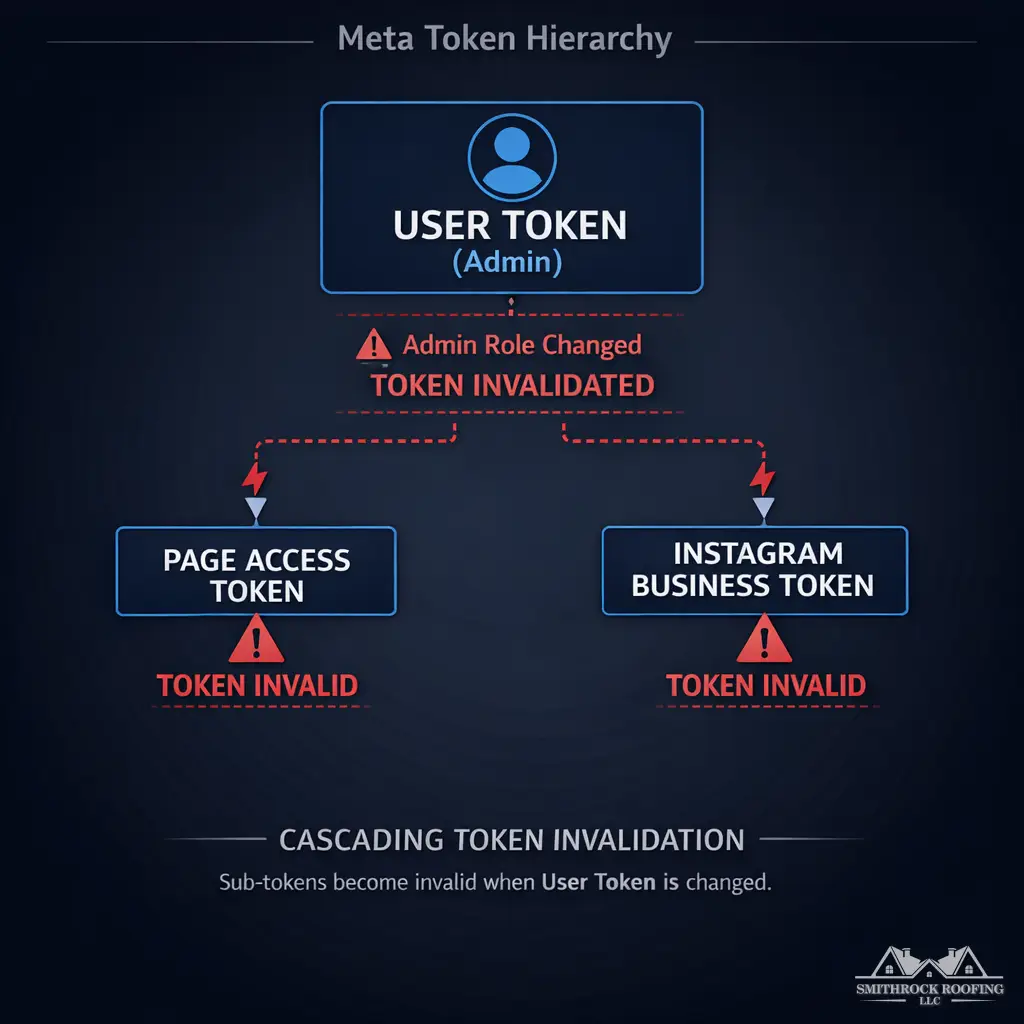
Meta’s cascading token invalidation. Facebook Page access tokens, User tokens, and dependent Instagram Business tokens are linked in a hierarchy. When a Page administrator role changes — a common event in any real-world business, particularly agencies managing client accounts — it can trigger simultaneous invalidation across every token in that hierarchy. A single admin change on the Facebook side can silently break Instagram publishing, Page posting, and analytics retrieval in one event with no outbound notification to your application.
The ghost account problem. When a user revokes your application’s permissions directly through a platform’s security settings (Facebook’s “Apps and Websites,” for example), most platforms do not fire a webhook to notify your application. Your system’s credential record shows a healthy connection. Posts continue to be queued and dispatched. Every one of them fails at the API level with a permissions error that your monitoring may be logging but not surfacing as a user-facing incident. This is the ghost account pattern — a connected account that exists in your system but has no valid authorization in reality.
The Correct Pattern: Proactive Token Health Monitoring
The standard industry advice — catch token errors when they occur — is reactive and creates a poor user experience. The production-appropriate architecture looks like this:
- Token health check jobs run on a scheduled cadence (every 24 hours is reasonable for most platforms) making a minimal, read-only API call for every stored credential. A failed call updates a token health status field in your database.
- User-facing credential status is surfaced in your UI before a publishing failure occurs. If a token fails its health check, the user sees an authentication warning and a prompt to reconnect — not a post failure notification after the fact.
- Token refresh logic is separated from request execution. Refresh attempts should be queued, retried with exponential backoff, and logged independently. A failed refresh during a request execution path causes silent failures; a failed refresh in a dedicated refresh job causes a clean, recoverable error state.
- Token expiry forecasting uses stored token issue timestamps and platform-documented expiry windows to generate proactive re-authentication prompts before tokens hit their expiry boundary.
This architecture costs engineering time upfront. It saves multiples of that time in debugging silent failures and handling user support requests.
Rate Limits Are a Distributed Systems Problem, Not a Configuration Detail
Listing rate limits as simple numbers — “300 requests per 15-minute window” — is accurate and misleading at the same time. The number is real. The implication that rate limit management is simple is not.
User-Context vs. App-Context Buckets
Most platforms enforce rate limits at two levels simultaneously:
- App-level limits apply to all requests made using your application’s credentials, regardless of which user initiated them
- User-context limits apply per OAuth token — meaning each individual user account has its own rate limit bucket
In a single-user integration (you building something for your own accounts), this distinction is irrelevant. In a multi-tenant SaaS serving hundreds or thousands of users, it is the difference between a stable system and one that collapses unpredictably.
Consider a concrete scenario: 500 users on your platform, all connected to X. Each user’s token has its own 15-minute request window for user-context endpoints. But your application itself has an app-level monthly post cap (enforced on X’s free-tier API access). Heavy usage by a subset of users can exhaust app-level quotas that then affect all users — including those whose individual token buckets are completely unused.
The Noisy Neighbor Failure Mode
Early-stage SaaS products commonly use a shared OAuth app credential rather than per-user token partitioning for certain operations. In this architecture, a single high-volume user — a “power user” posting dozens of times per day across multiple accounts — can exhaust the shared rate limit window and trigger 429 errors for every other user on the platform simultaneously. This is the noisy neighbor problem, and it’s not theoretical. It’s a common cause of mysterious, intermittent failures in social media management tools.
Platform-Specific Reset Behavior Demands Different Queuing Strategies
The behavioral differences between platforms require materially different approaches to request queuing:
- LinkedIn rate limits reset at midnight UTC regardless of when your request window started. This means a burst of requests at 11:45 PM UTC gets a fresh window in 15 minutes — behavior that a standard sliding-window queue will mishandle.
- X uses true rolling 15-minute windows tied to when the first request in the window was made. A sliding-window rate limiter is the correct tool here.
- YouTube uses daily quota units that are non-refillable and vary per endpoint. A video insert costs 1,600 units; a simple search costs 100 units. A system that treats all API calls as equal will exhaust quota unpredictably based on feature usage patterns, not request volume.
The Correct Architecture
Partition your request queue by platform and by user OAuth token. Implement per-token circuit breakers that open on repeated 429 responses and reclose after the platform-appropriate reset window. Build a priority queue that deprioritizes analytics polling requests when post-publishing capacity is constrained — missing a metrics refresh is acceptable; missing a scheduled post is not.
Permission Scope Strategy: Avoiding Approval Debt
The developer portal advice to “request only the permissions you need” is correct in isolation and damaging in practice, because it ignores how permission scope decisions compound over time.
How Approval Lock-In Works on Meta
When you submit a Meta application for App Review and receive approval for a specific set of permissions, that approval is scoped to exactly what you requested. The moment your product roadmap requires an additional permission — adding instagram_manage_comments after launching with only instagram_content_publish, for example — you must submit a new App Review for that incremental permission. Your previously approved app cannot use the new permission until the review is complete.
That review process takes 4–8 weeks under normal conditions, longer when reviewers request live demonstrations or additional policy documentation. Your approved production app is frozen at its current permission set during that window. Features that depend on the new permission cannot ship.
This is approval debt, and it compounds exactly the way technical debt does.
The Minimum Viable Permission Antipattern
The natural response to App Review complexity is to request the minimum possible permission scope to get through review quickly. This feels like the lean, pragmatic choice. In practice, it creates a brittle permission architecture that guarantees re-review cycles as the product grows.
Expert practitioners take the opposite approach: during the initial App Review submission, they request permissions based on a 12-month product roadmap, accepting higher initial review scrutiny in exchange for a stable permission foundation. The review is harder once; it doesn’t need to be repeated as each feature ships.
Permission Inheritance Traps
Platforms do not always document permission dependencies clearly. On Meta, pages_manage_posts grants the ability to publish content to a Page but does not include pages_read_engagement. Developers frequently discover this in production when analytics calls return empty data despite a valid, active token — because the token was issued without the engagement-read scope, and the API returns empty results rather than a meaningful error.
The operational fix is a living permission registry: a document that maps every API call your system makes to its required permission scope, reviewed before any new feature enters the development queue. Not after it ships. This document forces the permission conversation early, when the cost of adjusting scope is a planning revision rather than a re-review submission.
Idempotency, Webhooks, and the Reliability Problems Guides Ignore
Why Duplicate Posts Happen and How to Prevent Them
Every competitor article shows a POST /posts example. None mention idempotency. In production systems, network timeouts are not edge cases — they are regular events. When your application fires a post request to an API and the network times out before a response returns, your system has no way of knowing whether the request reached the platform, was processed, and resulted in a published post, or whether it was dropped before processing.
The naive response is to retry the request. The result is a duplicate post — a user-visible failure that is difficult to explain and damages trust in your platform.
The correct architecture requires client-generated idempotency keys on every write request. Your application generates a unique key (a UUID tied to the specific post job ID, for example), includes it in the request, and stores it alongside the job record. If the request is retried, the same key is reused. Platforms that support idempotency keys (not all do — this is an architecture you need to verify per platform) will recognize the duplicate key and return the original response rather than creating a second resource.
Where platforms don’t support idempotency keys natively, you implement it at your application layer: before dispatching a retry, check whether a post matching the job’s identifiers already exists via a GET request. Only dispatch the write if no matching post is found.
Webhook Reliability Is Not What It Appears
Meta’s webhook documentation describes a retry mechanism with a window of approximately 72 hours for unacknowledged events. What it does not emphasize: events within that retry window are not guaranteed to arrive in order. A comment event that occurred before a post deletion event may arrive after it, creating an inconsistent state in any system that processes events sequentially.
X does not offer webhooks for post status events at all. There is no notification when a post is published, fails, or is removed. Any system that needs to track post state on X must implement a polling layer — and that polling layer consumes rate limit quota that competes with your publishing operations.
The practical implication: webhook-driven architectures for social media integrations require a secondary polling reconciliation layer. Events that fail to arrive within an expected window should be recovered through a scheduled polling job that compares platform state with your application’s internal state. Webhooks are an optimization that reduces polling frequency; they are not a replacement for polling reliability.
Media Handling: Where Integrations Actually Break
Video and image upload flows are where the gap between documentation and reality is widest:
- Instagram video publishing is a three-step process: initialize a media container, upload the video bytes to the container, then publish the container. Each step has its own error states, timeout windows, and retry requirements. A failure at step two requires re-uploading bytes, not re-initializing the container — but only within the container’s validity window.
- TikTok requires chunked upload for videos above its documented size threshold. Chunk ordering, upload session IDs, and completion confirmation each need explicit handling. Session recovery after a failed chunk is not documented clearly and requires defensive implementation.
- YouTube uses a resumable upload protocol for files above a threshold, with session URIs that have a defined validity window. A session URI that expires mid-upload requires a new session initialization, not a simple byte-range retry.
Each platform’s media handling requirements are distinct enough that a generic media upload service cannot handle all of them without platform-specific branching logic. Build for this reality from the start rather than discovering it after your generic uploader ships.
The Business Continuity Risk Nobody Prepares You For
Platform API access is not a technical asset you build once and own. It is a conditional permission that platforms can modify or revoke.
Developer accounts can be suspended for policy violations — including violations you were unaware of — with no appeal process available in all cases. Approved application permissions can be reduced during platform-initiated audits. Major API versions can be deprecated on timelines that don’t accommodate your development cycle.
Meta deprecated and shut down significant portions of the Facebook Platform in 2018 with relatively short notice. Twitter’s migration from v1.1 to v2 broke thousands of integrations, and the restructuring that followed under new ownership accelerated API access restrictions and pricing changes that forced many businesses to rebuild their social media tooling from scratch.
Building a product feature that depends entirely on a single platform’s API access is a business continuity risk that belongs in your risk register alongside vendor concentration and infrastructure redundancy. The mitigation isn’t to avoid platform integrations — it’s to architect for graceful degradation, monitor platform policy communications actively, and maintain the engineering capacity to adapt quickly when API landscapes shift.
If you’re making decisions about how to structure social media integrations for your business’s marketing operations — not building a product, but leveraging platforms for your own growth — the calculus is different but the instability risk is the same. Working with a partner who tracks these platform changes continuously and adjusts strategy accordingly is how you avoid building on ground that shifts without warning. The social media services offered at Mongoose Digital Marketing are built around exactly this kind of ongoing platform stewardship.
Strategic Recommendations for 2026
The social media API landscape will continue to consolidate around access tiers, stricter data governance requirements, and faster deprecation cycles. These three recommendations reflect that reality.
1. Adopt a Middleware Abstraction Layer Through a Managed Integration Platform
Tools like Apify, Zapier’s developer platform, or purpose-built social API aggregators are maturing rapidly. Rather than maintaining direct API connections to each platform independently, routing your integrations through a managed middleware layer insulates your product from platform-specific breaking changes. When Twitter restructures its endpoint naming conventions or Meta adjusts its Graph API versioning, the abstraction layer absorbs the first impact. Evaluate these platforms specifically on their track record of maintaining compatibility during major platform transitions, not just their feature lists. The article Social Media Software: Choose the Right Platform provides a practical breakdown of how leading tools compare when platform stability is a primary requirement.
2. Implement Continuous Platform Policy Monitoring as a First-Class Engineering Practice
By 2026, passive awareness of platform policy changes will not be sufficient. Treat platform developer changelogs, policy update announcements, and deprecation notices as operational inputs that trigger engineering responses on a defined schedule. Assign ownership of this monitoring explicitly — it should not live informally across a team. Tools like Distill.io for changelog tracking, combined with structured reviews of platform developer blogs and official status pages, create an early warning system that extends your response window when disruption is coming.
3. Build Your Owned-Channel Infrastructure in Parallel
Email lists, SMS subscribers, and first-party data assets are the hedge against platform API instability. As you invest in social media integrations for 2026, allocate equivalent engineering and strategic attention to data portability — ensuring that audience relationships built through social platforms can migrate to owned channels when access conditions change. This is not a contingency plan. It is a foundational architectural decision that the most resilient marketing operations have already made.
Frequently Asked Questions
What is a social media API and how does it work?
A social media API (Application Programming Interface) is a set of rules and endpoints that allows external applications to communicate programmatically with a social media platform. When your tool posts content, retrieves analytics, or reads comment data from Instagram or LinkedIn, it is making structured requests to that platform’s API. The platform authenticates the request, checks whether your application has the required permissions, and returns data or confirms the action in a standardized format — typically JSON. The API acts as a controlled gateway: platforms decide what data can be accessed, at what volume, and under what conditions.
Why do social media platforms restrict API access so frequently?
Platforms restrict API access for a combination of regulatory, competitive, and operational reasons. Following increased scrutiny over data privacy — accelerated by events like the Cambridge Analytica investigation — platforms reduced third-party data access significantly to limit their liability exposure. Competitively, platforms also have financial incentives to keep engagement and advertising activity inside their owned interfaces rather than enabling third-party tools to replicate the experience externally. Operationally, open API access at scale creates infrastructure load that platforms manage through tiering and rate limiting. The result is that access policies have trended toward restriction rather than openness across most major platforms.
What is the difference between OAuth authentication and API key authentication for social platforms?
OAuth is a delegated authorization protocol that allows a user to grant your application specific permissions to act on their behalf without sharing their login credentials with you. When a user clicks “Connect your Instagram account” in your app and is redirected to Instagram’s login screen before being sent back, that is OAuth in action. API key authentication is simpler — your application is issued a key that identifies it to the platform, typically granting access to public or application-level data rather than user-specific data. Most social media platforms use OAuth for user data access and reserve API keys for lower-sensitivity, non-user-delegated operations. Understanding the distinction matters because OAuth tokens expire, require refresh logic, and can be revoked by the user at any time.
How should a business prepare for a social media platform deprecating an API it depends on?
Preparation starts before deprecation notices arrive. Architecting integrations with a platform abstraction layer — rather than hardcoding platform-specific API calls throughout your codebase — dramatically reduces the effort required to adapt when an endpoint changes or disappears. Beyond architecture, actively monitor the developer documentation, changelog feeds, and official communications for every platform your business depends on. When a deprecation notice does arrive, evaluate whether the replacement endpoint offers equivalent functionality, what the migration timeline allows, and whether the post-deprecation access model still supports your use case economically. Businesses that treat API access as a permanent entitlement rather than a conditional permission consistently find themselves in reactive emergency rebuilds. Those who plan for change as the default spend far less time in crisis mode.
Conclusion
Social media APIs represent both opportunity and operational risk. The businesses and development teams that navigate this landscape successfully share a common trait: they treat platform integrations as dynamic relationships that require ongoing stewardship rather than static technical assets built once and forgotten. Staying ahead of policy changes, architecting for resilience, and maintaining flexibility as platforms evolve are not advanced strategies — they are the baseline for operating in this environment without disruption.
If you are evaluating how to structure your social media integrations or looking for a partner who tracks these changes continuously on your behalf, we are ready to help. Contact Us