
Key Takeaways
- A technical SEO audit for a small business should begin with five foundational checks — HTTPS status, XML sitemap submission, robots.txt review, canonical tag baseline, and mobile usability — before any new content is published, because content built on a broken technical foundation produces zero rankings regardless of quality.
- Automated audit tools like Semrush routinely flag 40–60 issues on small business websites, but a significant portion of those flags are platform-level constraints on Wix, Squarespace, or shared hosting environments that cannot be fixed without a full site migration.
- When Google Search Console shows fewer indexed pages than your crawler found, the problem is almost always a content quality signal — not a technical crawl error — and requires a different response entirely.
- For small business websites with fewer than 200 pages, internal link architecture is the single most controllable mechanism for directing authority to high-value service pages, and it matters more than most other audit line items.
- Core Web Vitals scores derived from lab data and field data are not interchangeable; small businesses with low traffic volumes are often scored on lab proxies, which changes how optimization should be approached.
Running a technical SEO audit on your small business website should not feel like defusing a bomb. Yet for most business owners in Dayton, Kettering, and the surrounding Miami Valley communities, that is exactly how it feels — an automated tool spits out 80 flagged issues, assigns a site health score of 61 out of 100, and leaves you staring at a screen wondering whether your website is quietly collapsing or perfectly fine.
The honest answer is: it depends on which 80 issues they are, and whether any of them are actually fixable on your platform.
This is the conversation the standard SEO audit guide refuses to have. The dominant framework you will find across most articles boils down to “run the tool, read the report, fix the errors.” That approach works reasonably well for a 500-page e-commerce operation with a dedicated developer on staff. It does almost nothing useful for the owner of a 15-page HVAC company website in Beavercreek who is also answering service calls, managing a crew, and trying to generate leads before the heating season ends.
This guide is written for that person. It treats the technical SEO audit not as a tool operation exercise but as a business decision framework — one that tells you what to fix first, what to ignore entirely, and what the actual connection is between technical website health and the phone calls, form fills, and revenue you care about.
Why “Run the Tool” Is the Wrong Starting Point
Every audit guide starts with the tool. This one starts with a question: what are you trying the audit to accomplish?
For a small business website, there are exactly three legitimate answers to that question:
- You are preparing to invest in new content and want to ensure the technical foundation will actually let that content rank.
- Your rankings have dropped and you need to diagnose whether a technical issue is the cause before you chase algorithmic explanations.
- You have never audited your site and want an honest baseline assessment of where you stand.
Each of these scenarios has a different audit priority order. Mixing them up — which is what happens when you run a generic automated scan and treat every finding as equally urgent — is how you end up spending three weeks fixing image alt text on blog posts while your contact page is accidentally set to noindex.
The tool comes after the question. That sequencing matters.
The Pre-Content Technical Clearance: Your First Audit Priority
If you are in scenario one above — about to invest time or resources into new content — there is a minimum viable audit that should happen first. We call it the Pre-Content Technical Clearance. It consists of five checks, takes under 90 minutes to complete, and has more impact on content ROI than almost anything else you can do.
The Five Checks
1. HTTPS Status Verification
Open your website in a browser and confirm the address bar shows a padlock and begins with https://. Then test whether http:// redirects properly to https://. A broken or missing SSL certificate is a hard ranking signal and a trust barrier for visitors. In Google Search Console, check the Security Issues report for any active warnings.
2. XML Sitemap Submission
Navigate to Google Search Console, select your property, and go to Sitemaps under the Index section. Confirm your sitemap URL is listed and shows a green “Success” status. If it shows errors or has never been submitted, this is your first action item. Your sitemap is essentially the roadmap you hand Google for finding your pages — if it is missing or broken, you are making the crawler guess.
3. Robots.txt Review
Type your domain followed by /robots.txt directly into a browser (example: yourdomain.com/robots.txt). Look for any Disallow: / directives that are broader than intended. A common error on staging sites that have gone live is a blanket disallow that tells Google to crawl nothing. This single misconfiguration can make an entire website invisible in search results.
4. Canonical Tag Baseline
Right-click on your homepage and select “View Page Source.” Search for rel="canonical" in the code. The URL inside that tag should match your primary domain format exactly — meaning if your site uses https://www.yourdomain.com, the canonical should not point to https://yourdomain.com without the www. Canonical tag mismatches across your pages split your authority signals and create duplicate content confusion for search engines.
5. Mobile Usability Report in GSC
In Google Search Console, navigate to Experience > Mobile Usability. Any pages listed under “Failed” are actively underperforming in mobile search — which, for most local service businesses in Centerville, Springboro, or Miamisburg, represents the majority of their search traffic. Fix these before publishing a single additional page.
These five checks do not require a paid tool subscription. They require Google Search Console access — which is free — and about an hour of focused attention. If any one of these five items returns a problem, resolving it before publishing new content will produce more measurable ranking improvement than any amount of keyword optimization applied on top of a broken foundation.

The Fixable vs. Structural Issue Problem: What Your Audit Tool Will Not Tell You
This is the section that will save you the most frustration.
When a business owner in Huber Heights runs a Semrush or SEOptimer audit on their Wix website and gets back 55 flagged items, roughly half of those items may be structural constraints baked into the Wix platform itself. The tool does not distinguish between “you should fix this today” and “this is a platform architecture decision made in 2019 that you cannot change without migrating your entire site.”
The table below maps the most common technical audit flags to their actual fix status across the four platforms small businesses in the Dayton area most commonly use.
Platform-Specific Fixability Matrix
| Audit Flag | WordPress | Wix | Squarespace | Shopify |
|---|---|---|---|---|
| Meta title & description | Owner-fixable (Yoast/RankMath) | Owner-fixable (SEO panel) | Owner-fixable (page settings) | Owner-fixable (theme editor) |
| Image alt text | Owner-fixable | Owner-fixable | Owner-fixable | Owner-fixable |
| Schema markup | Plugin-solvable | App-limited (basic only) | App-limited | App-solvable (JSON-LD) |
| Custom redirect management | Plugin-solvable | Owner-fixable (basic) | Owner-fixable (basic) | App-solvable |
| Sitemap customization | Plugin-solvable | Platform-controlled | Platform-controlled | Platform-controlled |
| Server response headers | Host-dependent | Platform constraint | Platform constraint | Platform constraint |
| URL structure editing | Owner-fixable | Platform constraint (path structure) | Platform constraint | Limited by platform |
| JavaScript rendering issues | Theme/plugin dependent | Platform constraint | Platform constraint | Theme-dependent |
| Core Web Vitals optimization | Achievable with effort | Partially constrained | Partially constrained | Partially constrained |
| Internal linking | Owner-fixable | Owner-fixable | Owner-fixable | Owner-fixable |
| Canonical tag control | Full control (plugin) | Limited control | Limited control | Limited control |
| Page indexation control | Full control | Owner-fixable | Owner-fixable | Owner-fixable |
What this means in practice: If you are running a Wix site and an audit flags your URL structure as non-optimal, that is a structural constraint. Wix uses a specific subdirectory format that you cannot fully override. Spending hours trying to solve it is not a good use of your time. Instead, concentrate on the rows marked “owner-fixable” across the board — meta information, alt text, internal linking, and page indexation control. These are universally actionable regardless of platform.
The goal of any small business audit is not a perfect score. The goal is a prioritized list of actions where every item on the list is actually executable with the resources you have today. If you have ever wondered whether your platform itself is limiting your search performance, our article on website creators and what platforms hide from you covers exactly that tradeoff in depth.
The GSC vs. Crawler Gap: Where the Real Diagnostic Work Lives
Here is a scenario that plays out constantly for small business websites: you run a crawl with a tool like Screaming Frog or Semrush and it finds 85 pages on your site. Then you check Google Search Console’s Coverage report and it shows only 32 pages indexed.
Most audit guides will tell you this is a technical problem and send you looking for crawl errors. Sometimes they are right. More often, for a small business site, the gap is telling you something more important.
Reading the Indexed Page Gap
The relationship between your crawled page count and your indexed page count is a diagnostic signal with three distinct interpretations:
GSC shows significantly fewer indexed pages than your crawler found.
This almost always indicates a content quality issue, not a crawl issue. Google has found the pages, evaluated them, and decided they are not worth including in its index. Typical causes include thin content (pages under 300 words with minimal unique value), near-duplicate service area pages (“plumbing services in Dayton” and “plumbing services in Kettering” that are 90% identical), or old blog posts that have accumulated no backlinks and no engagement signals over years of existence.
The fix here is not technical. It is editorial. Consolidate thin pages, beef up near-duplicate pages with genuinely location-specific content, and consider noindexing or removing content that has never performed.
GSC shows more pages indexed than you expected.
This signals orphaned pages, legacy URL structures from an old website migration, or — critically for small businesses who tested their site on a staging environment — pages from a staging subdomain that were accidentally exposed to Google before the migration was complete. Check the Index Coverage report filtered to “Valid” pages and look for any URL patterns that do not belong to your current site architecture.
Pages appear in GSC’s “Crawled – currently not indexed” status.
This is Google’s soft rejection signal and it requires the clearest-headed response. These pages were crawled successfully — there is no technical barrier. Google simply decided they were not worth indexing. Treating this as a crawl error and submitting those URLs repeatedly through the URL Inspection tool will not help. The signal is a content quality verdict, not a technical failure, and it requires a content quality response.
Understanding this distinction — between a crawl problem and an indexation quality signal — is what separates a practitioner who reads crawler output from one who understands how Google’s decision architecture actually works.
Internal Linking: The Most Undervalued Line Item in Your Audit
Audit tools score internal linking issues identically to missing meta descriptions or image file size problems. In terms of the weight those items carry in the list, they look equivalent. In terms of actual impact on a small business website’s search performance, they are not remotely comparable.
For a small business website with limited domain authority — which describes almost every local service provider in Springboro, Miamisburg, or Kettering that has not been actively building links for years — internal link architecture is the primary mechanism for concentrating authority on your highest-value pages.
Think of it this way: your website accumulates authority signals over time through backlinks, brand mentions, and engagement. That authority does not distribute itself evenly. It flows through your site structure via internal links. If your most important page — your main services page, your contact page, or your highest-converting landing page — has three internal links pointing to it while your third-best blog post has twelve, you are actively directing authority away from the pages that generate revenue.
Internal Linking Priorities for Small Business Sites
When reviewing internal links in your audit, apply this priority hierarchy:
- Tier 1 — Fix immediately: Any broken internal links (404 errors) pointing to or from your primary service pages, contact page, or homepage. A broken link to your contact page is a direct conversion path failure.
- Tier 2 — Fix within 30 days: Service pages that have zero or only one internal link pointing to them. If Google cannot navigate to your “commercial HVAC service” page through your internal link structure, that page will consistently underperform relative to its content quality.
- Tier 3 — Ongoing improvement: Blog posts and resource content that do not link back to relevant service pages. Every piece of content on your site should create at least one pathway back to a commercial page where a visitor could become a lead.
A broken internal link to a blog post from 2021 is a minor housekeeping item. A broken internal link to your main services page is a business problem. Your audit tool will flag both. You should not treat both the same way.
Core Web Vitals: The Lab Data vs. Field Data Distinction Small Businesses Miss
Core Web Vitals (CWV) — Google’s set of page experience metrics covering loading speed (LCP), interactivity (INP), and visual stability (CLS) — appear on every audit checklist. The advice attached to them is almost always the same: improve your scores.
What that advice omits is a distinction that changes your entire optimization strategy.
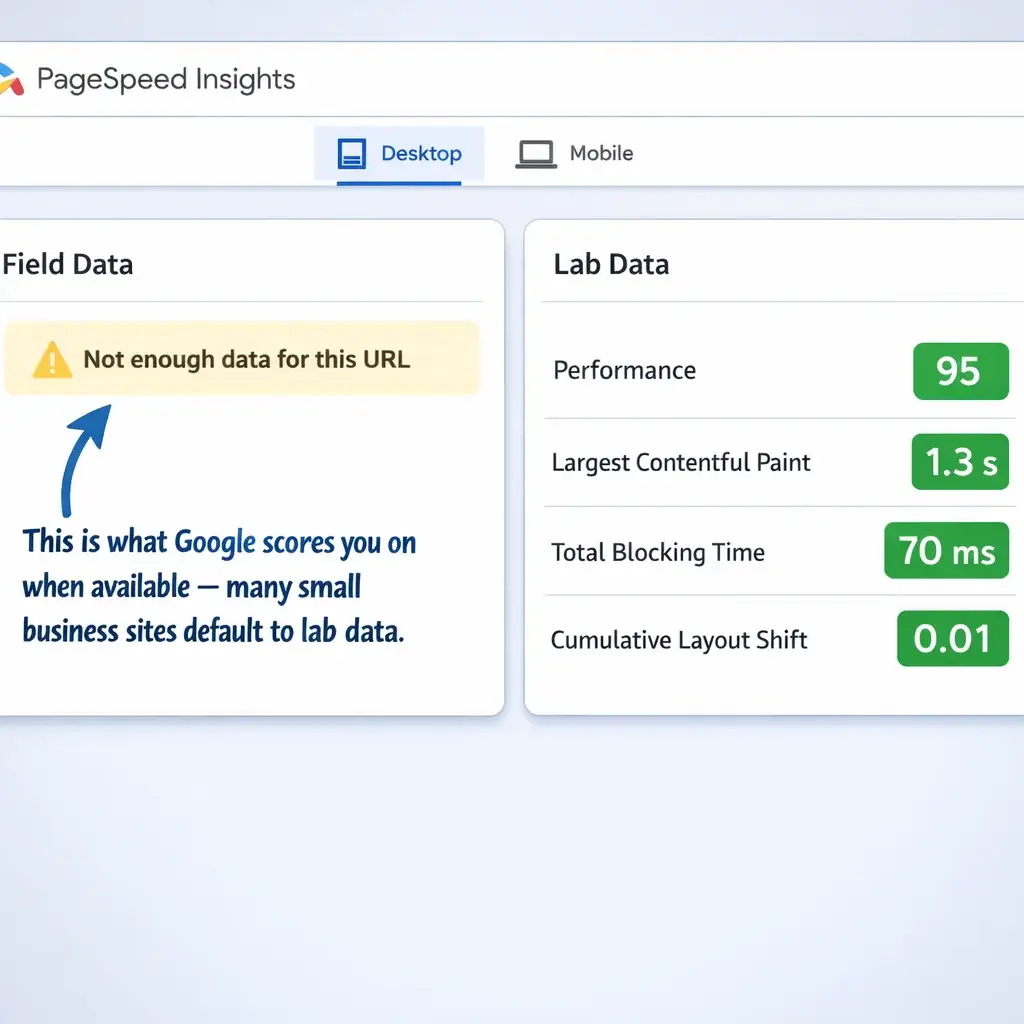
Google uses two types of CWV data. Field data comes from real users visiting your actual website, collected through the Chrome User Experience Report (CrUX). Lab data comes from synthetic testing tools like PageSpeed Insights or Lighthouse, which simulate a page load under controlled conditions.
For a local business in Beavercreek or Centerville with modest monthly traffic, your site may not have enough real user visits to generate statistically significant field data in the CrUX database. When that happens, Google falls back on lab data as a proxy for scoring your page experience.
This matters because lab data and field data often disagree, and the optimization techniques that move lab scores are not identical to those that move field scores. Lab data is extremely sensitive to server response time and render-blocking resources. Field data reflects the real-world variability of users on different devices, connection speeds, and network conditions across a geographic area.
If your site lacks field data, focus your CWV efforts on the metrics that lab tools measure most reliably: server response time (TTFB), image compression and lazy loading (for LCP), and layout shift prevention by setting explicit width and height attributes on images and embedded elements (for CLS). These optimizations translate more cleanly from lab scores to real-world performance than many of the more advanced CWV techniques that enterprise sites pursue. For a deeper dive into the practical fixes that move the needle on page speed for small business sites, the website speed optimization guide for small businesses covers the specific techniques worth prioritizing.
Which Audit Flags You Can Safely Deprioritize on a Small Business Site
One of the most practical things an experienced SEO practitioner can tell a small business owner is this: your audit report is not a to-do list. It is a dataset that requires interpretation.
Several categories of flags that appear on automated audit reports are genuinely low-stakes for a small business website with under 200 pages and a local-only audience:
Crawl budget warnings. Crawl budget — the number of pages Google will crawl on your site within a given period — becomes a meaningful technical concern for websites with thousands of pages. For a 20-page local plumber website in Dayton, Google is not rationing crawl visits to your site. If a tool flags crawl budget inefficiency on a small site, it is almost certainly responding to crawl log noise rather than a real issue. You do not have a crawl budget problem.
Hreflang tag errors. Hreflang attributes tell Google which version of a page to serve to users in different countries or language regions. If your business serves Dayton and the surrounding communities and has no international presence and no multilingual content, hreflang is not relevant to your site. Any tool flagging hreflang issues on a single-language, single-country local business site is generating noise.
Pagination errors. Unless your website has a blog with dozens of archived posts paginated across multiple pages, or an e-commerce catalog, pagination SEO is not a meaningful consideration. Most small business service sites do not paginate content at all.
AMP (Accelerated Mobile Pages) warnings. Google deprecated AMP as a ranking signal for mobile search. Any audit tool still recommending AMP implementation is working from an outdated framework.
Minor structured data warnings. Structured data (schema markup) is genuinely valuable for local businesses — particularly LocalBusiness schema, review schema, and FAQ schema. However, minor structured data warnings about optional fields, recommended properties that are not present, or non-critical validation errors in Google’s Rich Results Test are not worth significant remediation effort compared to the priority items above.
The ability to triage what not to fix is as valuable as knowing what to fix. An audit report that looks overwhelming becomes manageable the moment you can confidently cross off 30% of it as irrelevant to your specific site size, platform, and audience.
Building Your Three-Priority Action Plan
After completing a technical SEO audit, the output that actually drives results for a small business is not a comprehensive remediation spreadsheet. It is a focused, sequenced three-priority action plan built around this question: what are the three technical changes most likely to move a business metric I care about within the next 60 days?
For most small business websites in the Dayton metro area, that plan will look something like this:
Priority 1 — Remove the blockers. Resolve any technical issues that are actively preventing pages from being crawled or indexed. This includes robots.txt errors, noindex tags on important pages, SSL certificate problems, and broken canonical configurations. These are binary issues — a page either has a chance to rank or it does not. Fix the binary failures first.
Priority 2 — Strengthen the conversion pathways. Audit internal links to your primary service pages and contact page. Resolve broken links. Add internal links from your highest-traffic pages (usually the homepage and top blog posts, if any) to your highest-value commercial pages. This is a direct conversion path improvement, not just a rankings exercise.
Priority 3 — Address the experience signals. Fix mobile usability failures, compress images that are significantly slowing your page load, and stabilize layout shifts on your key landing pages. These improvements affect both your GSC experience scores and the actual behavior of real users who land on your site from search.
Everything else — the schema refinements, the crawl depth optimizations, the server header adjustments — gets scheduled for a future audit cycle, delegated, or reconsidered based on whether it is even fixable on your platform.
This is what a technical SEO audit actually looks like when it is designed to serve a business owner rather than to fill a checklist.
Working With an SEO Partner on Your Technical Audit
A thorough technical SEO audit done correctly takes time, requires access to multiple tools, and demands judgment calls that go beyond what any automated scanner can make on its own. For many small businesses across Dayton, Kettering, Beavercreek, and the wider Miami Valley region, the most effective path is working with a digital marketing partner who can not only identify the issues but contextualize them against your specific platform, your competitive landscape, and your business goals.
Mongoose Digital Marketing conducts technical SEO services in Dayton as part of a full-service SEO engagement — meaning the audit findings connect directly to a strategy for content, local search visibility, and conversion performance, not just a list of technical corrections. If your website has been underperforming in search and you are not sure whether the problem is technical, content-related, or competitive, a structured audit conversation is the right starting point.
Reach out to schedule a free consultation and find out where your site actually stands.
Strategic Recommendations for 2026
Technical SEO is not a one-time project. The sites that hold and improve their rankings over time are the ones that treat technical health as an ongoing discipline rather than a one-time cleanup. As you look ahead, here are three specific next steps worth prioritizing in the coming year.
1. Integrate Google Search Console with a Structured Review Cadence
Rather than checking GSC reactively when something seems wrong, build a monthly review into your workflow — or have your digital marketing partner do it on your behalf. In 2026, GSC continues to be the single most authoritative source of how Google is actually experiencing your site. Look specifically at crawl anomalies, coverage drops, and Core Web Vitals regressions after any site update, plugin change, or theme modification. Automated tools catch some of these, but a human review of GSC data catches the ones that matter to your actual traffic.
2. Adopt a Crawl-Based Monitoring Tool for Ongoing Audit Coverage
Screaming Frog SEO Spider remains the standard for periodic deep crawls on small business sites. In 2026, pair it with a lightweight scheduled monitoring tool — such as Sitebulb or a connected Google Looker Studio dashboard pulling live GSC and GA4 data — so you are not waiting for your annual audit to discover a broken redirect chain or a newly orphaned page. The goal is shrinking the window between when a technical problem appears and when it is caught.
3. Prioritize Page Experience Signals Around Your Highest-Value Pages
Core Web Vitals scoring is now a permanent part of Google’s ranking environment, and the 2026 landscape puts additional weight on Interaction to Next Paint as a field metric. Use PageSpeed Insights and the CrUX data available in GSC to benchmark your key landing pages — not your whole site — and focus improvement efforts there first. A small business does not need a perfect technical score across every URL. It needs fast, stable, accessible experiences on the pages where search traffic is most likely to convert.
Frequently Asked Questions
How long does a technical SEO audit take for a small business website?
For a small business site with fewer than a few hundred pages, a thorough technical SEO audit typically takes between a few days and a couple of weeks, depending on the depth of the review and how many issues require manual investigation. A surface-level automated scan takes far less time, but those reports rarely surface the judgment-based findings that actually move the needle. A full audit that results in prioritized, actionable recommendations — rather than a raw list of flagged items — requires a qualified person to interpret the data in the context of your specific site, platform, and goals.
Do I need a technical SEO audit if my site was recently built or redesigned?
Yes, often more urgently than an older site. New builds and redesigns are one of the most common sources of technical SEO regressions. Canonical tags get misconfigured, redirects from old URLs are missed, pages that should be indexed get accidentally blocked, and site speed that looked fine in staging performs poorly in the real-world field data that Google uses for ranking. A post-launch technical audit is one of the most high-leverage investments a small business can make after a site goes live.
What is the difference between a technical SEO audit and a general SEO audit?
A technical SEO audit focuses specifically on how search engines discover, crawl, render, and index your site — and on the experience signals, like page speed and mobile usability, that influence rankings. A general or full SEO audit also encompasses content quality, keyword targeting, backlink profile, and competitive positioning. Both are valuable, but for a business that has invested in content and local presence without seeing results, the technical audit is often the right place to start because it identifies whether the foundational infrastructure is working before layering in additional strategy.
How often should a small business redo a technical SEO audit?
For most small businesses, a meaningful technical audit once every twelve months is a reasonable baseline, with lighter monitoring happening on a monthly basis through Google Search Console. That said, a technical audit should also be triggered by specific events — a platform migration, a major site redesign, a significant drop in organic traffic, or a Google algorithm update that correlates with a rankings change. Treating the audit as purely time-based rather than event-aware means you may catch problems long after they have already caused measurable damage.
Conclusion
A technical SEO audit is one of the most clarifying investments a small business can make — not because it fixes everything at once, but because it replaces guesswork with a clear picture of what is actually holding your site back. Mongoose Digital Marketing works with businesses throughout Dayton and Kettering to do exactly that: connect the technical findings to a real strategy for search visibility, local presence, and sustainable growth. If your site has not been performing the way it should, the best next step is a conversation — Contact Mongoose Digital Marketing to schedule your free consultation today.